TaurusTrendDialog
-
class
TaurusTrendDialog(parent=None, designMode=False, taurusparam=None, toolbar=True, **kwargs)[source]¶ Bases:
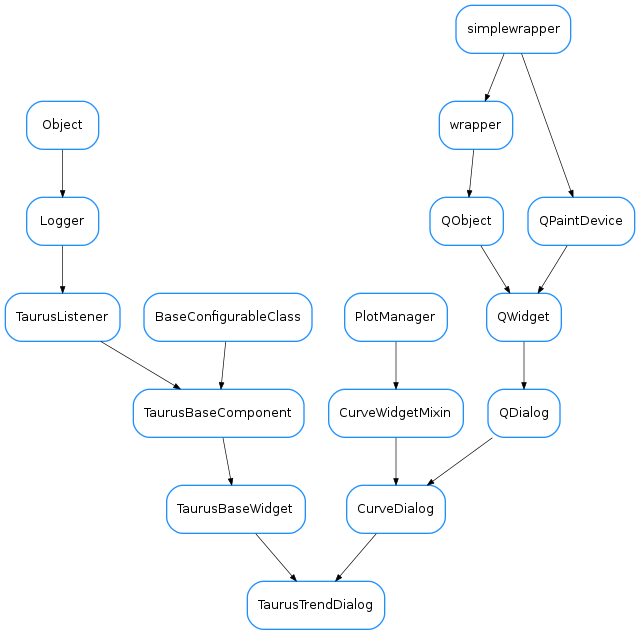
guiqwt.plot.CurveDialog,taurus.qt.qtgui.base.taurusbase.TaurusBaseWidgetA taurus widget for showing trends of scalar data. It is an specialization of
guiqwt.plot.CurveWidget, for displaying trends and offering the expected Taurus interface (e.g. setting models, save/apply configs, drag&drops,...)See also
-
addModels(modelNames)[source]¶ Creates TaurusCurveItems (one for each model in modelNames) and attaches them to the plot.
Note
you can also add curves using
add_items().addModels()is only a more Taurus-oriented interface.add_items()gives you more control.Parameters: modelNames ( sequence<str> orstr) – the names of the models to be plotted. For convenience, a string is also accepted (instead of a sequence of strings), in which case the string will be internally converted to a sequence by splitting it on whitespace and commas.See also
add_item()
-
getMaxDataBufferSize()[source]¶ returns the maximum number of events that can be plotted in the trend
Return type: intReturns:
-
getUseArchiving()[source]¶ whether TaurusTrend is looking for data in the archiver when needed
Return type: boolReturns: See also
-
maxDataBufferSize¶ returns the maximum number of events that can be plotted in the trend
Return type: intReturns:
-
model¶ reimplemented from
TaurusBaseWidget
-
modelChanged
-
modifiableByUser¶ whether the user can change the contents of the widget
Return type: boolReturns: True if the user is allowed to modify the look&feel
-
setMaxDataBufferSize(maxSize)[source]¶ sets the maximum number of events that will be stacked
Parameters: maxSize ( int) – the maximum limitSee also
TaurusTrendSet
-
setModel(modelNames)[source]¶ Removes current TaurusCurveItems and adds new ones.
Parameters: modelNames ( sequence<str> orstr) – the names of the models to be plotted. For convenience, a string is also accepted (instead of a sequence of strings), in which case the string will be internally converted to a sequence by splitting it on whitespace and commas.See also
-
setStackMode(mode)[source]¶ set the type of stack to be used. This determines how X values are interpreted:
- as timestamps (‘datetime’)
- as time deltas (‘timedelta’)
- as event numbers (‘event’)
Parameters: mode ( one of 'datetime', 'timedelta'or'event') –
-
setUseArchiving(enable)[source]¶ enables/disables looking up in the archiver for data stored before the Trend was started
Parameters: enable ( bool) – if True, archiving values will be used if available
-
stackMode
-